CloudWatch Synthetics
Canary Recorder Blueprint
1. Objective ▾
This blueprint mirrors a user's flow on a website (e.g. clicking on specific elements and submitting text). The synthetic can:
- capture screenshots at each step
- HAR file with HTTP request/response
- execution logs from the underlying Lambda Function
Note: HAR file is generated for Chrome browser only.
The synthetic performs the following steps:
- Navigate to Home
- Navigate to DevOps Agent: Automatic Investigation
- Navigate to Using Query Parameters (AWS CLI)
- Navigate to Search
- Submit a query
- Confirm search results provided
2. CloudWatch Synthetic Recorder ▾
To assist with deployment, the CloudWatch Synthetic Recorder is available as a Google Chrome extension. It records the client and type actions on the website and generates a Node.js script that can be used to create the canary.
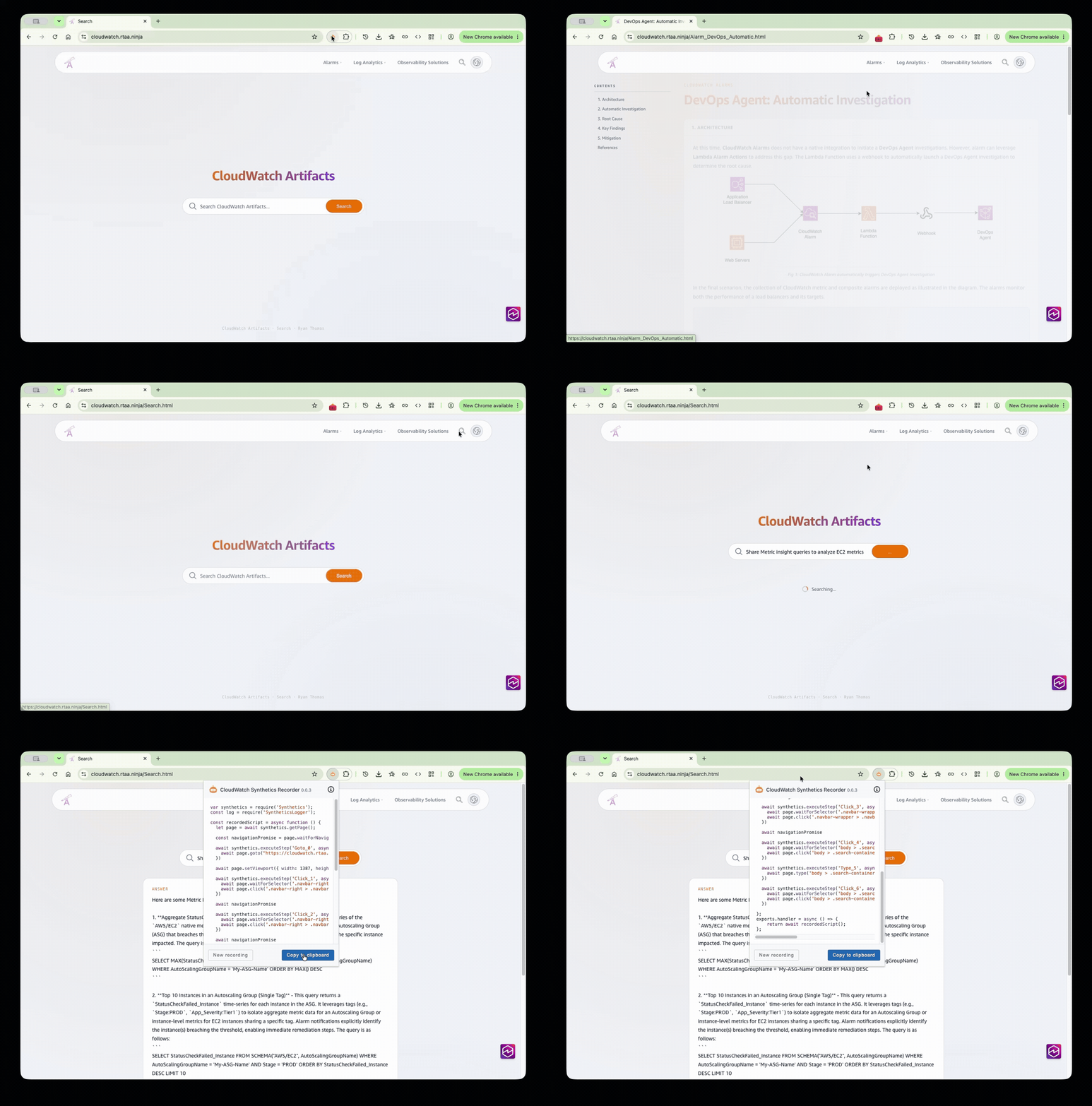
Fig 1: CloudWatch Synthetics Recorder capturing a browser flow
3. Configuration ▸
JavaScript
var synthetics = require('Synthetics');
const log = require('SyntheticsLogger');

/**
 * Helper: open a navbar dropdown by hovering its top-level <li>, then click a
 * link inside it (identified by href) and wait for the resulting navigation.
 *
 * The site's dropdowns are hidden with `visibility:hidden` and only revealed by
 * `.navbar-nav > li:hover .navbar-dropdown`. The links inside therefore are not
 * "visible" (in Puppeteer terms) until the parent <li> is hovered, which is why
 * waiting directly on a dropdown link times out. We hover first, then click.
 */
const openDropdownAndNavigate = async function (page, menuIndex, linkHref) {
  const liSel = `.navbar-nav > li:nth-child(${menuIndex})`;
  const linkSel = `${liSel} .navbar-dropdown > a[href="${linkHref}"]`;

  // Make sure the menu item exists, then hover it to reveal its dropdown.
  await page.waitForSelector(liSel, { visible: true, timeout: 30000 });
  await page.hover(liSel);

  // Now the dropdown link should become visible; wait for that, then click and
  // wait for the navigation it triggers.
  await page.waitForSelector(linkSel, { visible: true, timeout: 15000 });
  await Promise.all([
    page.waitForNavigation({ waitUntil: 'networkidle0', timeout: 60000 }),
    page.click(linkSel),
  ]);
};

const recordedScript = async function () {
  let page = await synthetics.getPage();

  // Disable the automatic per-step screenshots (one on step start, one on step
  // success). Without this, executeStep() captures two screenshots per step on
  // top of our explicit takeScreenshot() calls. Turning both off leaves exactly
  // one screenshot per step: the explicit takeScreenshot() we take after each.
  //
  // Also enable full request/response capture (headers and bodies) in the run
  // report / HAR file. These are global SyntheticsConfiguration reporting
  // options (off by default so credentials aren't recorded inadvertently);
  // enabling them records the HTTP request and response headers and bodies for
  // every request the browser makes during the flow. This site is a public,
  // unauthenticated demo, so there are no secrets in these headers/bodies.
  synthetics
    .getConfiguration()
    .withScreenshotOnStepStart(false)
    .withScreenshotOnStepSuccess(false)
    .withIncludeRequestHeaders(true)
    .withIncludeResponseHeaders(true)
    .withIncludeRequestBody(true)
    .withIncludeResponseBody(true);

  // Set the viewport once, up front, so every screenshot is captured at the
  // same, intended resolution.
  await page.setViewport({ width: 1727, height: 963 });

  // --- Page 1: initial load ---------------------------------------------
  await synthetics.executeStep('Goto_0', async function () {
    await page.goto('https://cloudwatch.rtaa.ninja/', {
      waitUntil: 'networkidle0',
      timeout: 60000,
    });
  });
  await synthetics.takeScreenshot('Goto_0', 'home-loaded');

  // --- Page 2: open "Alarms" dropdown, go to "DevOps Agent: Automatic" ---
  // Menu 1 = Alarms. Original recorder used a:nth-child(2) in that dropdown,
  // which is Alarm_DevOps_Automatic.html. Selecting by href is stable.
  await synthetics.executeStep('Click_1', async function () {
    await openDropdownAndNavigate(page, 1, 'Alarm_DevOps_Automatic.html');
  });
  await synthetics.takeScreenshot('Click_1', 'alarms-devops-page');

  // --- Page 3: open "Log Analytics" dropdown, go to "Query Parameters" ---
  // Menu 2 = Log Analytics. Original recorder used a:nth-child(9) in that
  // dropdown, which is Log_Analytics_Query_Parameters_AWS_CLI.html.
  await synthetics.executeStep('Click_2', async function () {
    await openDropdownAndNavigate(page, 2, 'Log_Analytics_Query_Parameters_AWS_CLI.html');
  });
  await synthetics.takeScreenshot('Click_2', 'log-analytics-query-params-page');

  // --- Go to the search page via the navbar search icon ------------------
  // The search icon links to the Search page. Clicking it navigates there.
  await synthetics.executeStep('Click_3', async function () {
    const iconSel = '.navbar-right .navbar-search-icon';
    await page.waitForSelector(iconSel, { visible: true, timeout: 30000 });
    await Promise.all([
      page.waitForNavigation({ waitUntil: 'networkidle0', timeout: 60000 }),
      page.click(iconSel),
    ]);
    // Confirm the search input rendered on the destination page.
    await page.waitForSelector('.search-bar input', { visible: true, timeout: 15000 });
  });
  await synthetics.takeScreenshot('Click_3', 'search-page');

  // --- Focus the search input -------------------------------------------
  await synthetics.executeStep('Click_4', async function () {
    const inputSel = '.search-bar input';
    await page.waitForSelector(inputSel, { visible: true, timeout: 15000 });
    await page.click(inputSel);
  });

  // --- Type the query and submit the search ------------------------------
  await synthetics.executeStep('Type_5', async function () {
    const inputSel = '.search-bar input';
    await page.type(inputSel, 'Share Metric insight queries to analyze EC2 metrics');

    // Submit the search. Prefer the search button if present; fall back to
    // pressing Enter.
    const btnSel = '.search-bar .search-btn';
    const btn = await page.$(btnSel);
    if (btn) {
      await page.click(btnSel);
    } else {
      await page.keyboard.press('Enter');
    }

    // The results container (.search-results) exists but is empty/hidden until
    // results arrive (`.search-results:empty { display:none }`). Wait for a
    // child (answer or citation) rather than the container's own visibility.
    try {
      await page.waitForSelector('.search-results .search-answer, .search-results .citation', {
        visible: true,
        timeout: 20000,
      });
    } catch (e) {
      // Don't fail the whole run if results are slow or the backend is quiet;
      // capture whatever state the page is in so the run still produces a
      // meaningful screenshot.
      log.warn('search results did not render in time; capturing current state: ' + e);
    }
  });
  await synthetics.takeScreenshot('Type_5', 'search-results');
};

exports.handler = async () => {
  return await recordedScript();
};