CloudWatch Alarms
Alerting via Microsoft Teams
1. Introduction ▾
Using Lambda as a CloudWatch Alarm action, offers flexibility in the notification channels and remediation actions.
In this example, a Lambda Function is used to publish CloudWatch Alarm Notifications to a Teams channel. As a prerequisite, a webhook must be created for the channel prior to deployment.

Fig 1: CloudWatch Alarm integration with Microsoft Teams
- The ALB emits
HTTPCode_ELB_502_Countdatapoints to CloudWatch. - CloudWatch Alarm threshold is breached and transitions to ALARM state.
- CloudWatch posts a JSON object to Lambda.
- Lambda parses the JSON object for
alarm_name,description,reasonandtimestampfields and creates an Adaptive Card. - Lambda then publishes the Adaptive Card to a Teams channel using the webhook URL.
- This code can be customized and extended to match your use case.
2. Sample Lambda Source ▸
Python
def format_adaptive_card(event):
    """Transform a CloudWatch alarm event into a Teams Adaptive Card payload."""
    _TEAMS_MAX_PAYLOAD_BYTES = 28_672
    _PAYLOAD_OVERHEAD_BYTES = 1_024  # conservative buffer for card structure

    alarm_data = event.get("alarmData", {})
    alarm_name = alarm_data.get("alarmName", "N/A")
    description = alarm_data.get("configuration", {}).get("description", "N/A")
    reason = alarm_data.get("state", {}).get("reason", "N/A")
    timestamp = alarm_data.get("state", {}).get("timestamp", "N/A")
    account_id = event.get("accountId", "N/A")

    # Truncate reason if it would push the payload over the Teams limit
    max_reason_len = _TEAMS_MAX_PAYLOAD_BYTES - _PAYLOAD_OVERHEAD_BYTES
    if len(reason.encode("utf-8")) > max_reason_len:
        reason = reason[:max_reason_len] + "\u2026"

    payload = {
        "type": "message",
        "attachments": [
            {
                "contentType": "application/vnd.microsoft.card.adaptive",
                "contentUrl": None,
                "content": {
                    "$schema": "http://adaptivecards.io/schemas/adaptive-card.json",
                    "type": "AdaptiveCard",
                    "version": "1.4",
                    "body": [
                        {
                            "type": "TextBlock",
                            "text": f"\U0001f6a8 CloudWatch Alarm: {alarm_name}",
                            "weight": "Bolder",
                            "size": "Medium"
                        },
                        {
                            "type": "FactSet",
                            "facts": [
                                {"title": "Timestamp", "value": timestamp},
                                {"title": "Account ID", "value": account_id},
                                {"title": "Alarm Name", "value": alarm_name},
                                {"title": "Description", "value": description},
                                {"title": "Reason", "value": reason}
                            ]
                        }
                    ]
                }
            }
        ]
    }
    return payload


def send_to_teams(webhook_url, payload):
    """POST the Adaptive Card payload to the Teams webhook. Raises on failure."""
    data = json.dumps(payload).encode("utf-8")
    req = urllib.request.Request(
        webhook_url,
        data=data,
        headers={"Content-Type": "application/json"},
        method="POST"
    )
    try:
        with urllib.request.urlopen(req) as response:
            status_code = response.getcode()
            if status_code < 200 or status_code >= 300:
                body = response.read().decode("utf-8", errors="replace")
                logger.error(
                    "Teams webhook returned non-2xx status: %d, body: %s",
                    status_code, body
                )
                raise RuntimeError(
                    f"Teams webhook failed with status {status_code}"
                )
    except urllib.error.HTTPError as e:
        body = e.read().decode("utf-8", errors="replace")
        logger.error(
            "Teams webhook HTTP error: %d, body: %s", e.code, body
        )
        raise RuntimeError(
            f"Teams webhook failed with status {e.code}: {body}"
        ) from e


def handler(event, context):
    """Lambda handler invoked by CloudWatch Alarm action."""
    logger.info("Received CloudWatch alarm event: %s", json.dumps(event))

    webhook_url = os.environ.get("TEAMS_WEBHOOK_URL")
    if not webhook_url:
        raise ValueError(
            "TEAMS_WEBHOOK_URL environment variable is not set"
        )

    payload = format_adaptive_card(event)
    send_to_teams(webhook_url, payload)
3. Alarm Breached Threshold ▾
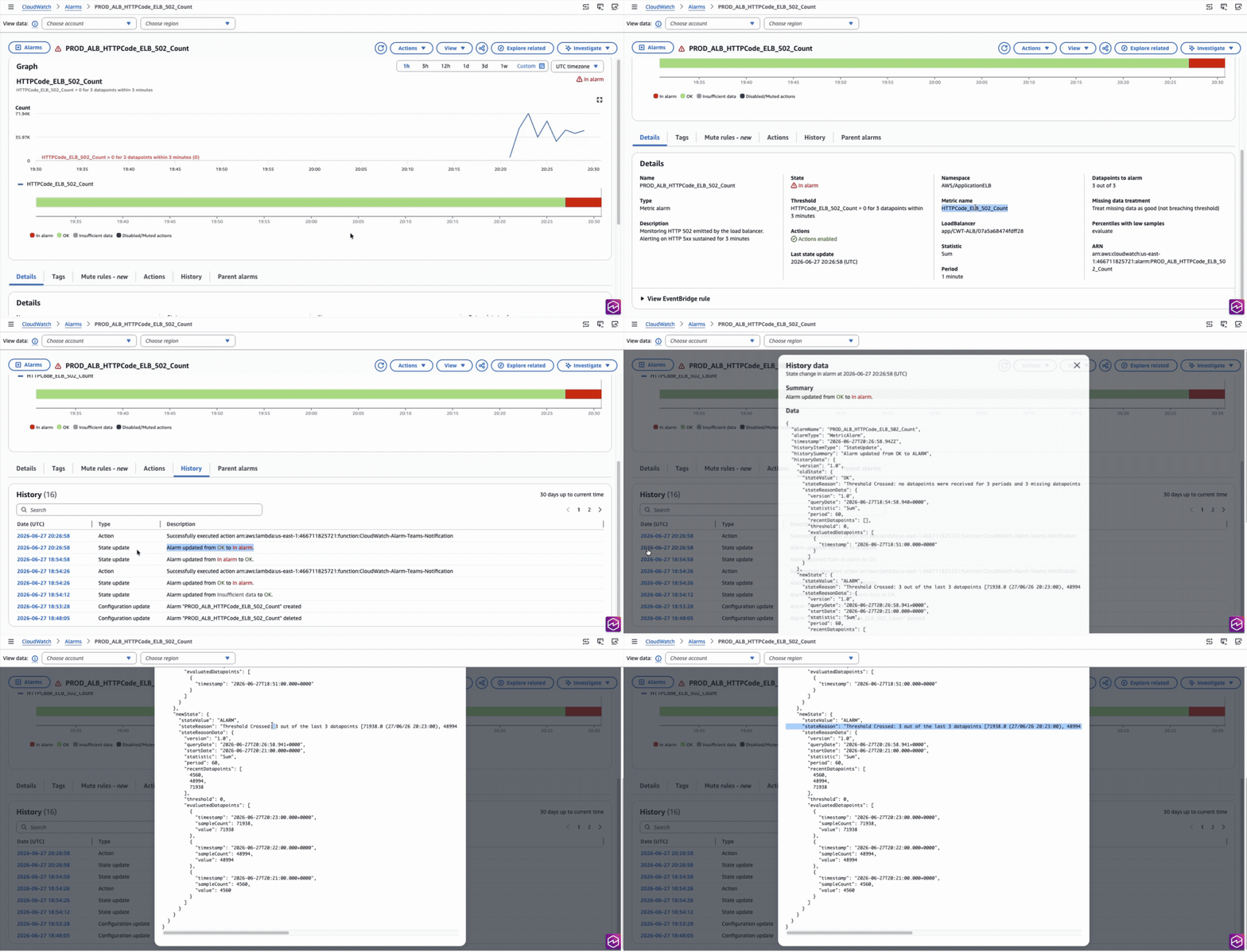
Fig 1: CloudWatch Alarm transitioned to ALARM State
4. Alarm Notification Delivered to Teams Channel ▾
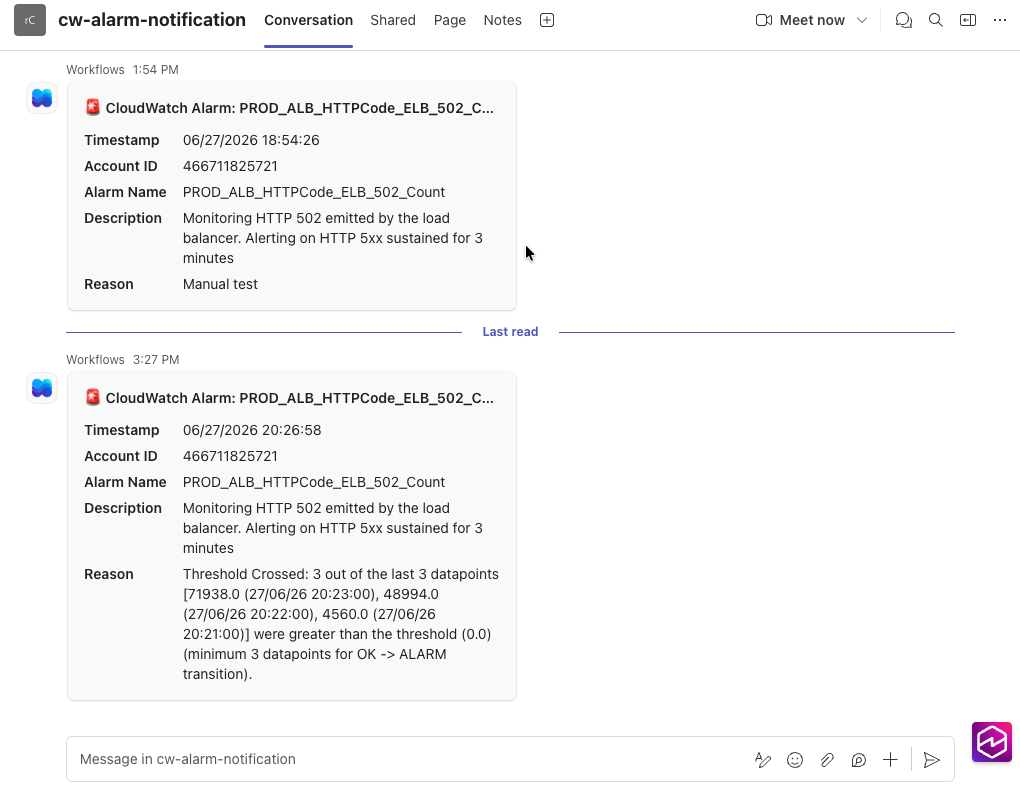
Fig 2: CloudWatch Alarm Notification successfully delivered to Teams Channel